AI Appointment Scheduling: How It Works, Best Tools and How to Cut No-Shows
AI appointment scheduling explained: the full booking lifecycle, the four types of tools, what research says about reminders and no-shows, and setup tips.
AI appointment scheduling means letting artificial intelligence handle the whole life of a booking: finding a free slot, confirming it, sending reminders, moving it when plans change and following up when someone does not show. For a small business this is not a detail. Every booking that gets lost in an email thread, a missed call or a forgotten reminder is revenue that walks out of the door.
Most scheduling tools solve only the first step: they give your customers a link to pick a time. As Vellum's review of scheduling tools points out, reminders, rescheduling and follow-ups are usually left to people. This guide covers the whole cycle: how AI scheduling works, which types of tools exist, what the research says about no-shows, what users complain about and how to set it up so that it really saves time.
Key takeaways
AI scheduling covers the full lifecycle, not only the booking link.
Reminders work: in clinical trials, two reminders cut missed appointments more than one.
Tools fall into four families: booking links, calendar optimisers, email agents and voice agents.
Setup decides success: real-time availability, clear rules and an easy way to reach a person.
What is AI appointment scheduling?
AI appointment scheduling uses language models and automation to book, confirm, remind and reschedule appointments with little or no human work. The key difference from a classic booking widget is conversation. Instead of asking the customer to fill in a form, an AI agent can understand a request like "can I come in next Tuesday after work?", check the calendar, suggest two options and book the one the customer chooses.
The AI can work on different channels: a booking page on your website, email, chat, messaging apps and the phone. The phone still matters a lot for local businesses. Many people prefer to call a clinic, a salon or an estate agent, and a call that goes unanswered often ends with a booking at a competitor. An AI receptionist can answer every call and book the appointment during the conversation.
The full appointment lifecycle
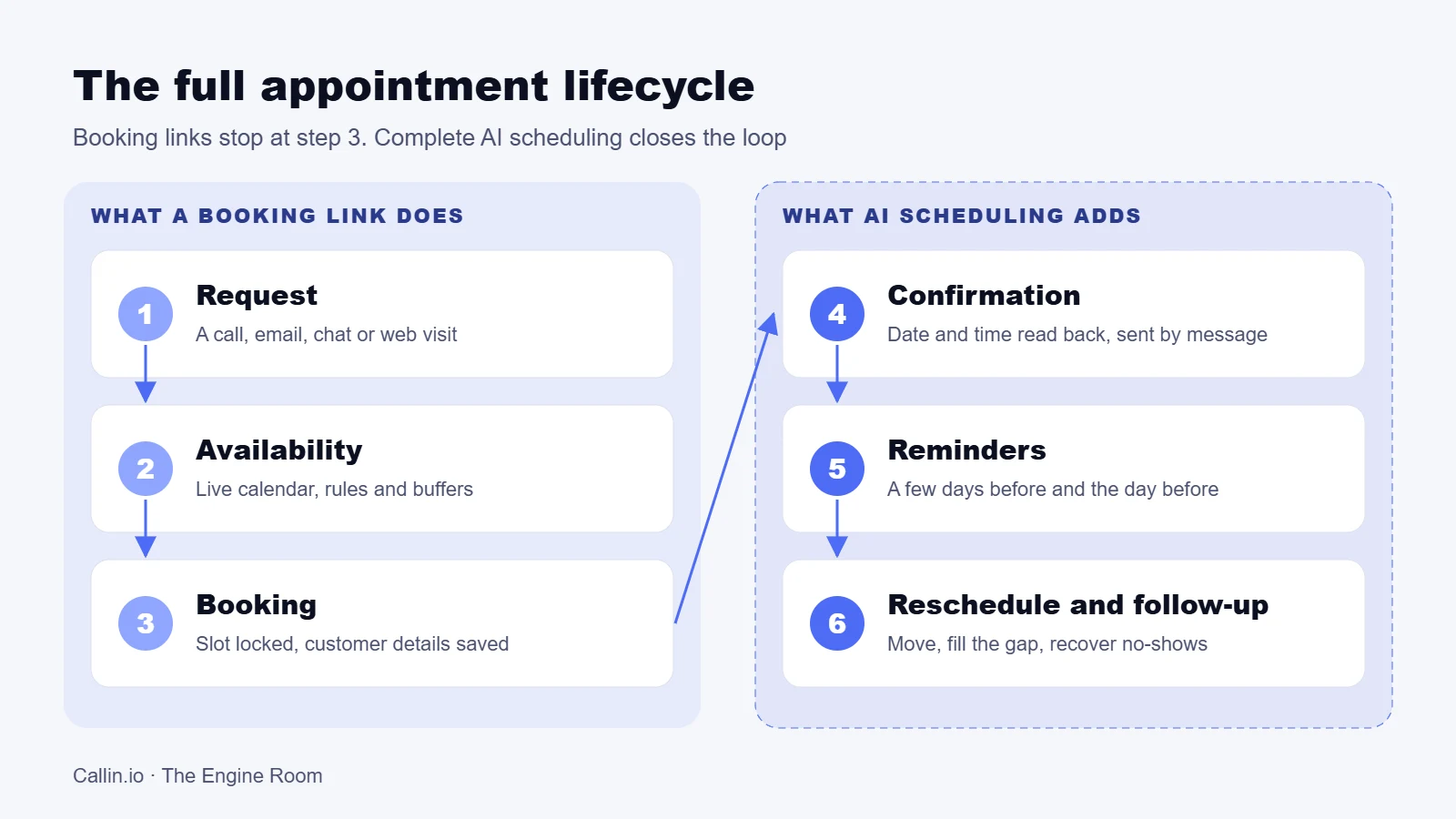
To understand what AI can automate, it helps to split a booking into its stages. Each one is a point where a manual process can fail.
Infographic: Callin.io, The Engine Room
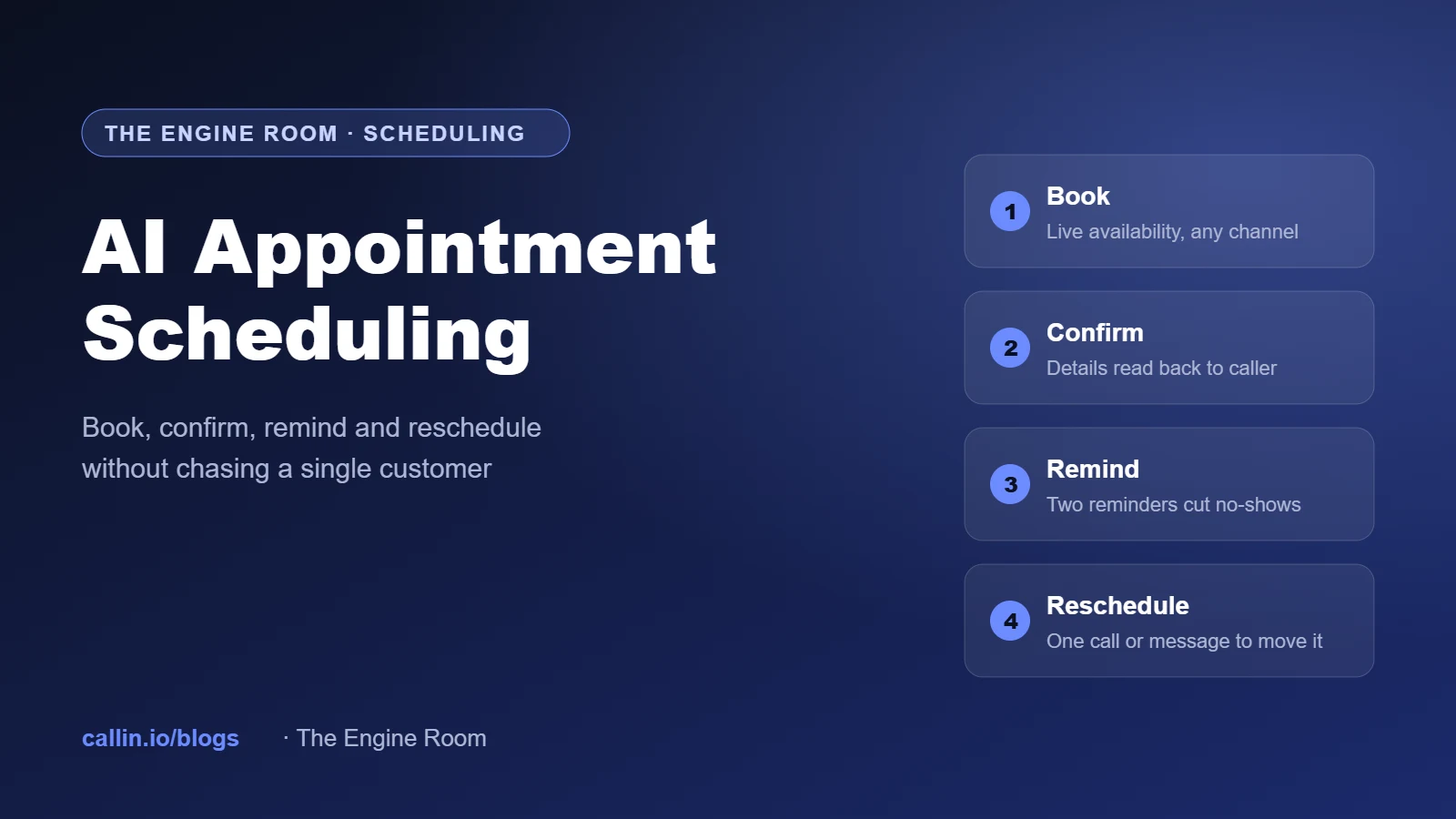
Booking links cover stages one to three. Complete AI scheduling also covers confirmation, reminders, rescheduling and follow-up after a no-show. That second half is where most of the time and money is lost, because it is repetitive and easy to forget on a busy day.
Photo: Estée Janssens on Unsplash. The paper planner is still common, but it cannot send a reminder on its own.
What the research says about no-shows
Missed appointments are expensive: an empty slot cannot be sold again. Healthcare has studied the problem in depth, and the results apply to any business that works by appointment.
Infographic: Callin.io, The Engine Room. Sources: American Journal of Medicine (2010), AJMC (2018), Frontiers in Digital Health (2025)
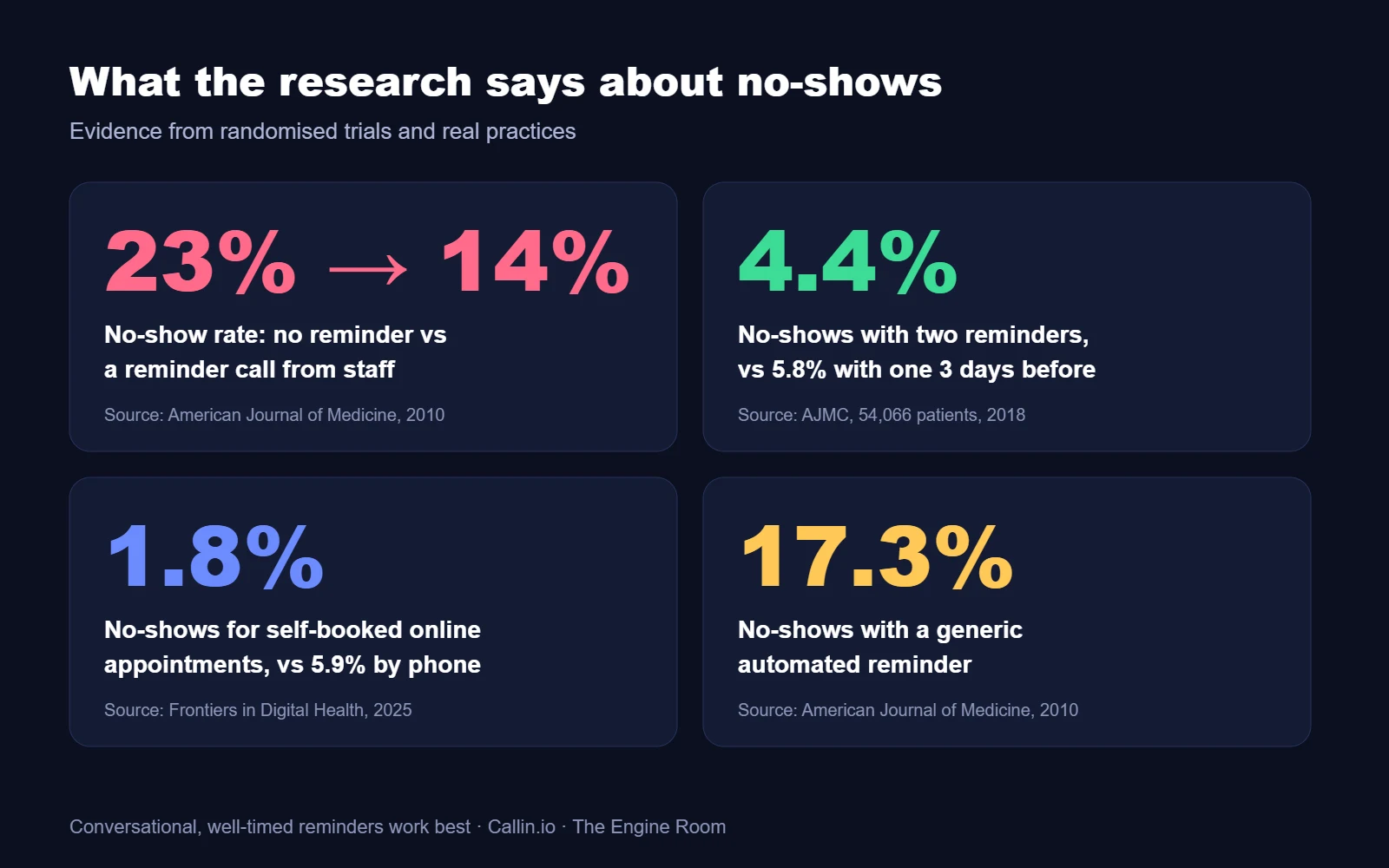
In a trial published in the American Journal of Medicine, the no-show rate was 23.1% without reminders, 17.3% with an automated phone reminder and 13.6% with a reminder call from staff. A personal, conversational reminder worked best, and that is exactly what a good AI voice agent can now deliver at scale.
A larger randomised trial in AJMC, with 54,066 patients in 25 primary care clinics, compared reminder timings. One reminder three days before gave a 5.8% no-show rate, one reminder the day before gave 5.3%, and both reminders together gave 4.4%. For patients at high risk of missing appointments, the gap was even larger.
Letting people book by themselves helps too, when it is done right. A 2025 study in Frontiers in Digital Health found that in a private practice, appointments booked online had a median no-show rate of 1.8%, against 5.9% for phone bookings. In a hospital where patients could only send a request and not pick their slot, online bookings had more no-shows. The lesson: people keep appointments they chose themselves.
The four types of AI scheduling tools
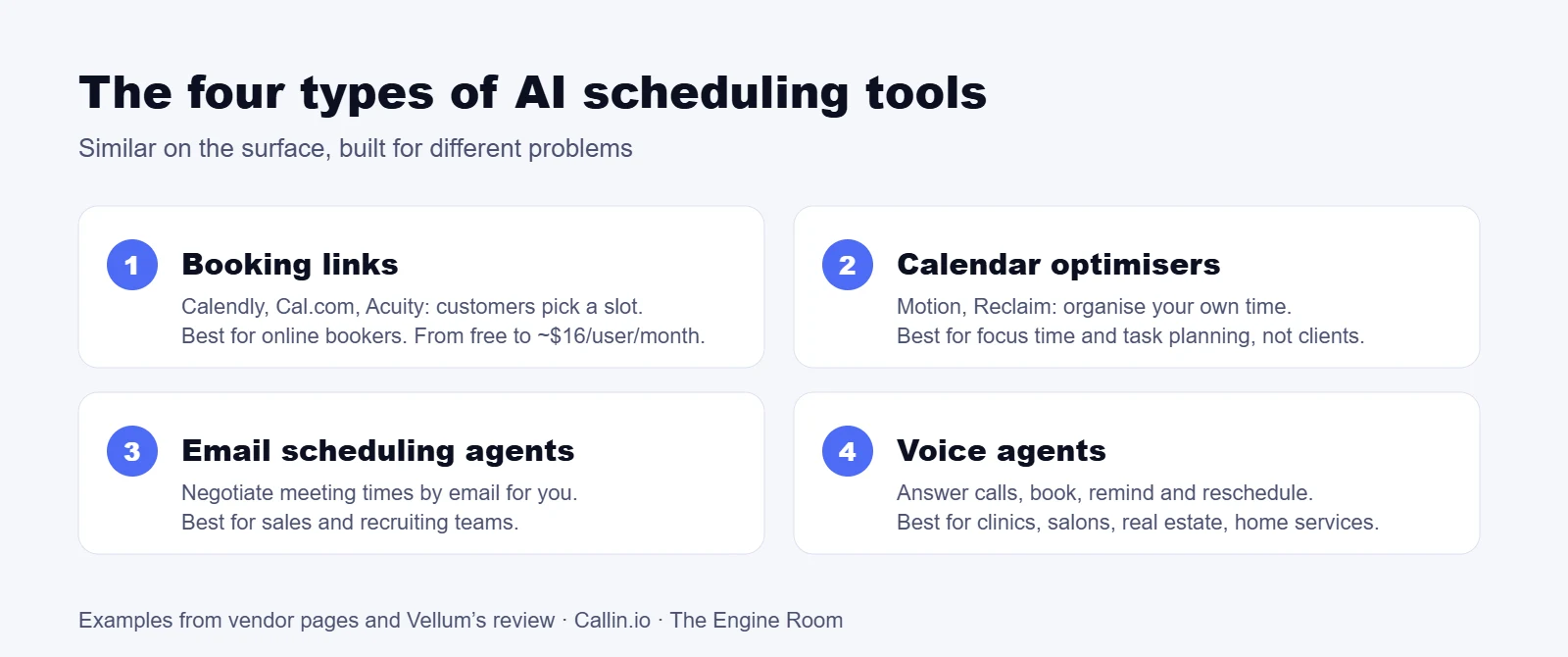
The market is crowded, and tools that look similar solve very different problems. Grouping them into families makes the choice easier.
Infographic: Callin.io, The Engine Room. Examples and prices from vendor pages and Vellum's review
Booking links such as Calendly, Cal.com and Acuity Scheduling let customers pick a slot from your availability. Calendly is the most widely recognised; Cal.com is open source and can be self-hosted; Acuity adds payments and intake forms for service businesses. Calendar optimisers such as Motion and Reclaim organise your own time, protecting focus hours and moving tasks around meetings. Email scheduling agents negotiate meeting times by email on your behalf. Voice agents answer and make calls, book during the conversation, send reminders and call back to reschedule.
One warning from the market: Clockwise, a popular calendar optimiser, shut down in March 2026 when its team joined Salesforce, according to Vellum's review. Before you build your processes around a tool, check how you can export your data and settings.
How to choose the right tool
Vellum's review weighs four criteria, and they are a good starting point for any business:
Depth of automation: does the tool handle only the booking, or also reminders, rescheduling and no-show follow-up?
Fit for your business: price, setup time and ease of use for your team and your customers.
Integrations and channels: your calendar, CRM, practice or property software, payments, and the channels your customers use, including the phone.
Data ownership: where customer data is stored, who can access it and how you can take it with you.
Add one more question: who are your customers? If they are professionals who live in their inbox, a booking link may be enough. If they are patients, homeowners or local clients who pick up the phone, you need an agent that can talk. Our guide to the AI answering service explains the difference between answering calls and resolving them.
What users complain about
Discussions on Reddit about AI receptionists and booking assistants tell a consistent story. Practices praise the end of missed calls and the extra bookings from evenings and weekends. Front-desk staff often see the AI as help, because it takes the repetitive calls.
The complaints are just as clear. Callers describe agents that ask for every detail upfront and repeat the same question, pauses of several seconds that break the conversation, and systems that make it hard to reach a person. Some patients even lowered a clinic's online rating for this reason. The shared conclusion is that success depends on setup, not on the tool alone.
How to set up AI scheduling correctly
Check availability in real time. The agent must read the live calendar before offering a slot and lock it at the moment of booking, so two people never get the same time.
Define the rules. Durations for each service, buffers between appointments, opening hours, holidays, which staff member can do what, and how far ahead people can book.
Handle time zones and dates carefully. Always read back the day, date and time: "Tuesday the 14th at 3 pm, is that right?"
Ask only what you need. Name, contact, reason for the visit. Long questionnaires belong in a form sent after the booking.
Send two reminders. Following the AJMC trial, one a few days before and one the day before, with an easy way to confirm or move the appointment.
Make rescheduling easy. A customer who can move an appointment in one message or one call is less likely to simply not show up.
Always offer a person. Urgent, sensitive or unusual requests must go to your team, with a summary of the conversation.
For voice agents, the way you write the instructions matters as much as the calendar setup. Short sentences, one question at a time and confirmations read back aloud make the difference, as we explain in our guide to prompting AI voice agents.
Where AI scheduling pays off most
Clinics and dental practices: bookings, reminders and waiting-list fill-ins, with urgent symptoms routed straight to staff.
Salons and wellness: calls arrive while staff are busy with clients, often with their hands full.
Real estate: property viewings booked in the evening and at weekends, when interest peaks. See our AI phone agents for real estate.
Home services: plumbers, electricians and technicians who cannot answer while on a job.
Professional services: consultants, lawyers and accountants who need qualified first meetings.
Privacy and transparency
Booking data is personal data, and in healthcare it can reveal information about someone's health. Under the GDPR you need a legal basis, a data processing agreement with your vendor and clear retention rules. If the agent talks with people, Article 50 of the EU AI Act requires that they know they are speaking with an AI, unless it is obvious. A short sentence at the start of the call is enough. This is general information, not legal advice.
Metrics to track
Booking rate: share of enquiries that end with an appointment.
No-show rate, before and after reminders.
After-hours bookings: appointments that would have been lost without the AI.
Reschedules versus cancellations: a moved appointment is revenue saved.
Transfer rate: how often the agent hands over to a person, and why.
Time saved by your team each week.
For voice agents, also compare the cost per booked appointment with what a missed booking is worth. Our AI voice agent pricing guide explains how to calculate it.
Watch: practical ways to reduce no-shows
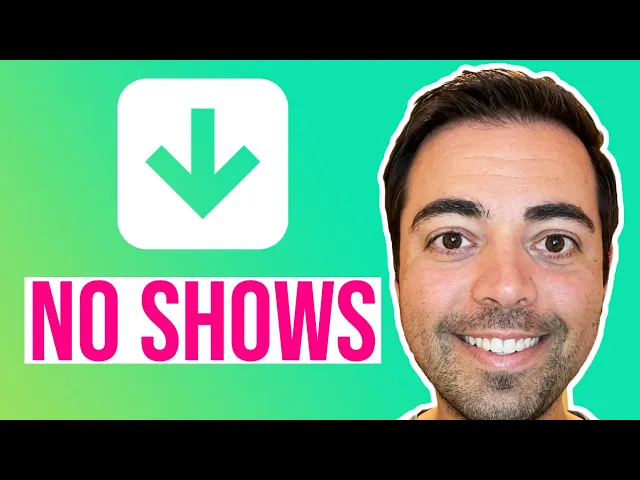
In this video Dr. Ryan Corte, an optometrist, shares practical ways to reduce patient no-shows in a practice. His tips apply to any business that works by appointment, and they pair well with the reminder rules described above.
Frequently asked questions
What is the best AI appointment scheduling tool?
It depends on your customers. Booking links such as Calendly or Cal.com work well for professionals who book online. Businesses whose customers call need a voice agent that can book during the call and handle reminders and changes.
Can AI reduce no-shows?
Yes. Clinical trials show that reminders reduce missed appointments, that two reminders work better than one, and that conversational reminders work better than generic automated messages.
Can an AI agent reschedule appointments?
Yes. A good agent can move an appointment by phone, email or message, checking the calendar in real time and confirming the new slot.
Does AI scheduling work with my calendar?
Most tools connect to Google Calendar and Outlook, and many to industry software for clinics, salons or property. Check the integration before you choose.
Is it safe for patient data?
It can be, if the vendor offers GDPR-compliant processing, a data processing agreement and appropriate security. In healthcare, check also sector rules and where data is stored.
How much does it cost?
Booking links start free or from about $10 per user per month. Voice agents are usually billed by the minute; compare the cost per booked appointment, not only the price per minute.
The bottom line
AI appointment scheduling is not about a nicer booking page. It is about closing the loop: every enquiry answered, every appointment confirmed, every customer reminded and every change handled without your team chasing it. Start with one service, set clear rules, send two reminders and measure the no-show rate.
Want an AI agent that answers your calls and books appointments in your calendar? Try Callin.io for free, or read how an AI phone agent works.